SFTP Task for SSIS/SSDT
This guide contains description of creating SFTP1 file transfer task for SSIS using WinSCP scripting. The preferred approach is to use the WinSCP .NET assembly from SSIS script task .NET code.
WinSCP offers scripting interface that you can use to automate file transfers to/from SFTP server.
Advertisement
Before Starting
Before starting you should:
Script file
Start by creating WinSCP script file to transfer your files.
Below you can see a basic script example for downloading file from SFTP server. For details see guide to automation or detailed documentation of scripting functionality. You can also have WinSCP generate a script template for you.
open mysession -hostkey="ssh-rsa 2048 xxxxxxxxxxx..."
get /remotepath/data.dat c:\localpath\
exit
In the script you need at least to:
- Replace
mysessionargument toopencommand with specification of SFTP connection in formsftp://username:password@hostname/or use name of site. - Replace host key fingerprint after
-hostkeyswitch ofopencommand with actual fingerprint of your SFTP/SSH server host key;2 - Replace paths after
getcommand with actual paths to remote file to download from and local directory to download to.
Save the script into file accessible from SSIS.
Advertisement
SSIS/SSDT task
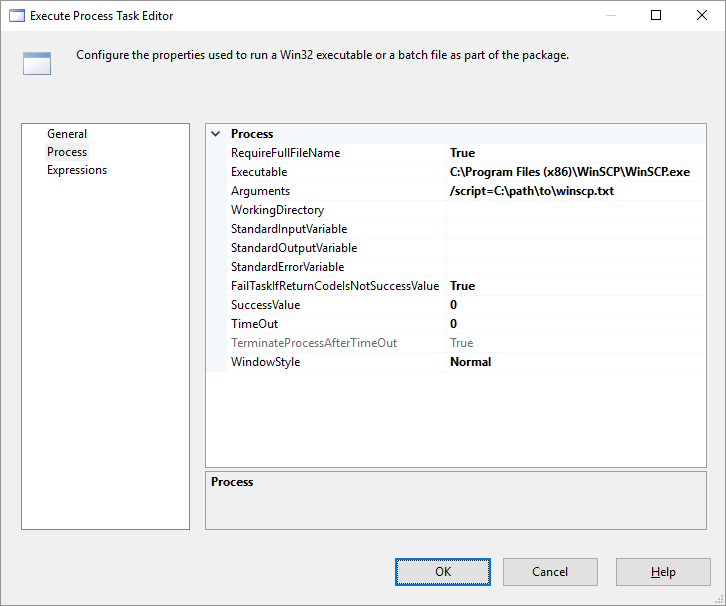
In SSIS/SSDT, add new Execute Process Task to control flow of your package. In the Execute Process Task Editor:
- Put path to WinSCP executable (by default
C:\Program Files (x86)\WinSCP\WinSCP.exe) into Executable; - In Arguments specify
/script=<pathtoyourscript>(Alternatively you can specify all commands here using/commandswitch, as used the command-line template that WinSCP can generate for you); - You may want to set WorkingDirectory to path, where you want to download files to/upload files from, if you do not use absolute paths in your script.
Further Reading
- FAQ about SFTP task hanging when run from SSIS;
- Scripting documentation;
- Command-line parameters;
- Guide to scripting;
- FAQs about scripting;
- Troubleshooting.
Other References
Advertisement