Documentation » Using WinSCP »
Select/Unselect Dialog
Use Select/Unselect Dialog to (un)select files in file panel using file mask. To show the dialog go to Mark > (Un)Select Files.
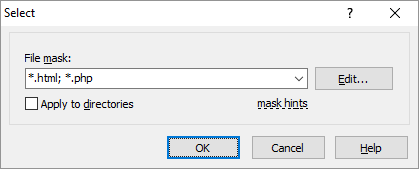
In the File mask box enter the file mask to match the files to (un)select.
Press Edit button to edit the file mask in File mask dialog. This can be particularly useful, when you want to select files using a file list.
Use the Including directories checkbox to specify, whether file masks match also subdirectories. Directory masks (ending with slash) always match subdirectories.
Advertisement