Tabs
Tabs are placed below toolbars. You can use them to manage your opened sessions and file managers (in Commander interface only).
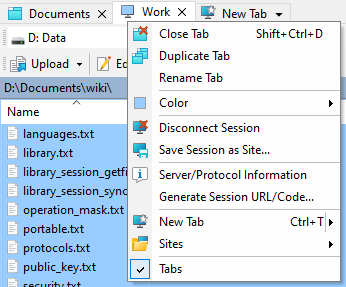
- Working with Tabs
- Switching Tabs
- File Operations with Session Tabs
- Renaming Tab
- Workspaces
- Other
- Keyboard Shortcuts
Working with Tabs
Click on the tab to switch to a session or a file manager it represents.
Click on the New Tab tab to add new session or file manager (in Commander interface only). In the drop-down menu of the tab, you can select explicitly to add new session or file manager. You can also select, what kind of tab opens by default. Hold down Ctrl while clicking the New Tab to open the other kind of tab.
Click on the X button on a tab or click the same with middle button to close a session or a file manager.
Right-click on the tab to pop up context menu with other tab and session management commands.
Drag tab to change tab order.
Switching Tabs
Once you have several tabs opened you can switch among them. The easiest way is to simply click on the tab. If you work primarily with a keyboard, you can go to Tabs > Opened Tabs or use keyboard shortcuts.
By default each opened tab remembers its own panel state, including focused file and panel sorting. In Commander interface when working with remote servers, the local panel remembers also the last used local directory for each session. This behavior can be turned off for both panels, or for local panel only.
File Operations with Session Tabs
Drop local files to the session tab to upload them using the session.
Drop remote files to the session tab to duplicate them using the session.
Renaming Tab
Particularly when you have multiple sessions opened to the same site, you may want to distinguish them by giving individual tabs a unique name. To rename the current tab, go to Tabs > Rename Tab.
The tab names are preserved in a workspace.
Workspaces
You can save all our opened tabs into a workspace and restore them later.
Other
To hide tabs go to View > Session Tabs in Explorer interface or Options > Session Tabs in Commander interface.
If you want to see full tab titles, even if they do not fit into the window, go to the Window page in Preferences.
If the session has associated color, session tab shows icon of that color.
If the session is disconnected, session tabs shows grayed.
Keyboard Shortcuts
Keyboard shortcuts for tab management are the same for both interfaces.