The Tunnel Page (Advanced Site Settings dialog)
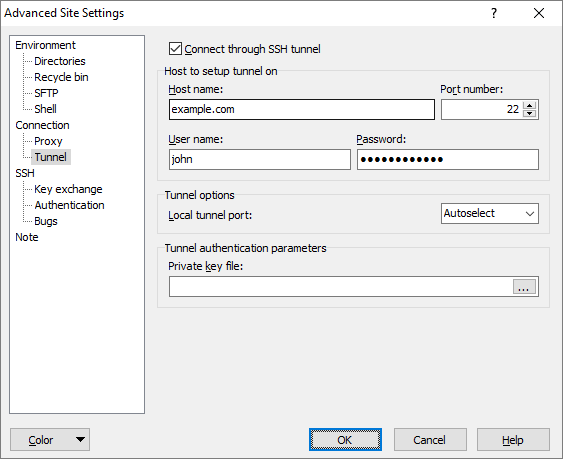
The Tunnel page on the Advanced Site Settings dialog allows you to setup your session to tunnel through SSH connection.
Advertisement
To reveal this page you need to select SFTP or SCP file protocol on Login dialog.
Refer to documentation of page sections:
Session Tunneling
To enable tunneling, tick the Connect through SSH tunnel.
In the Host to setup tunnel on box configure basic settings for the SSH tunnel session. The meaning of the boxes is the same as the respective options for the main session on the Login dialog.
The tunnel inherits some session settings from the main session, including settings for proxy and SSH protocol (including key exchange and authentication).
For more complex tunnels (non-default SSH settings, multiple hops, etc.) you need to setup tunnel using external tool, such as PuTTY SSH client.
Tunnel Options
Use Local tunnel port if you need to use specific port for the SSH tunnel. This is particularly useful if you want to use the opened tunnel for another applications. When Autoselect is selected, WinSCP will automatically pick a free port from range 50000 through 50099.
Tunnel Authentication Parameters
Use the Private key file box to specify local path to your private key file if you are going to use public key authentication for tunnel. For details see documentation for private key for main session.
Advertisement
Further Reading
Read more about Login dialog and Advanced Site Settings dialog.