The Endurance Page (Preferences Dialog)
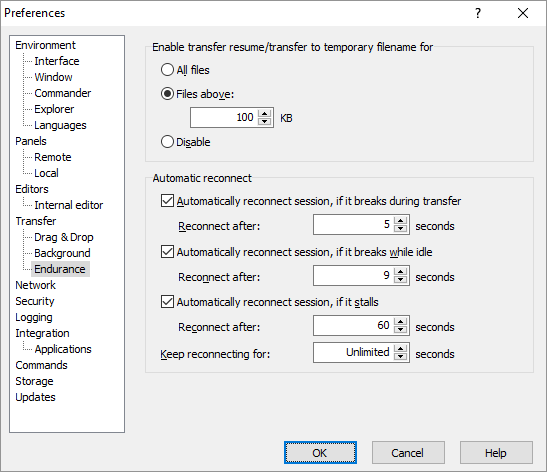
The Endurance page on the Preferences dialog allows you to configure support for automatic transfer resuming and reconnecting.
Advertisement
Refer to documentation of page sections:
Transfer Resume / Transfer to Temporary Filename
WinSCP is able to transfer files to temporary filename first, renaming it to the target name only once the transfer successfully finishes. This allows for automatic transfer resume; as well as preserving the existing target file for duration of the transfer (what is particularly useful when updating frequently accessed files on web sites).
Transfer to temporary filename is supported with SFTP protocol only and only for binary transfers. However with other protocols you can resume transfers also manually. Though the option still has some effect with the FTP protocol, it controls whether a file transfer is automatically resumed, after a connection is restored, when it breaks in a middle of a file transfer, or if the transfer restarts from the beginning.
In scripting, use -resumesupport switch of file transfer commands. In .NET assembly, use TransferOptions.ResumeSupport property.
Automatic Reconnect
Use the Automatically reconnect session, if it breaks during transfer checkbox to enable reconnection of the session (and resuming transfer) when it breaks while transferring files. This is supported with SFTP and FTP protocols.
Use the Automatically reconnect session, if it breaks while idle checkbox to enable automatic reconnection of sessions, while WinSCP is idle.
In Reconnect after configure how long will WinSCP wait before reconnection attempt. Note that you can always force earlier attempt manually. The setting applies for foreground sessions only. For background transfers the interval is always 2 seconds.
Advertisement
Use the Automatically reconnect session, if it stalls checkbox to enable automatic reconnection of session, when the server stopped responding. Use Reconnect after to set how long should WinSCP keep waiting for response. Note that this value should be higher than Server response timeout. This is supported with SFTP and SCP protocols.
In Keep reconnecting for configure maximal time WinSCP should attempt to reconnect. Use Unlimited to allow WinSCP reconnect indefinitely.
Further Reading
Read more about Preferences dialog and its other pages.