This is an old revision of the document!
Documentation » Using WinSCP » Basic Tasks »
Renaming Files
To rename file, focus it in file panel and go to File(s) > Rename, click respective toolbar button or use file context menu.
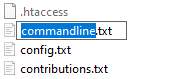
In-line editor box will appear over name of file.
Advertisement
Enter a desired new name and press Enter or click outside of the box to confirm. To cancel renaming press Esc.
Note you cannot rename remote files with SFTP-2 and older.
If you want to rename set of remote files using operation mask, use Move to function.