Authentication Failed

Advertisement

Guest

Authentication Failed

I am using this:
# Path to WinSCP .NET assembly
Add-Type -Path "C:\Program Files (x86)\WinSCP\WinSCPnet.dll"
 
# Session options
$sessionOptions = New-Object WinSCP.SessionOptions -Property @{
    Protocol = [WinSCP.Protocol]::Sftp
    HostName = "blah.com"
    UserName = "XXXXX"
    Password = "XXXXX"
    SshHostKeyFingerprint = "ecdsa-sha2-nistp256 256 xx:xx:xx etc"
}
 
$session = New-Object WinSCP.Session
 
try {
    # Open SFTP session
    $session.Open($sessionOptions)
 
    # Upload file (local -> remote)
    $transferResult = $session.PutFiles(
        "C:\doz\", # local path (can be wildcard)
        "/New/" # remote folder or file path
    )
 
    # Throw if any transfer failed
    $transferResult.Check()
}
finally {
    $session.Dispose()
}
The error I am getting is:
Exception calling "Open" with "1" argument(s): "Authentication failed.
Authentication log (see session log for details):
Using username "XXXXX".
Access denied.
Authentication failed."
At C:\it.info\winscp.ps1:17 char:5
+ $session.Open($sessionOptions)
+ ~~~~~~~~~~~~~~~~~~~~~~~~~~~~~~
+ CategoryInfo : NotSpecified: (:) [], MethodInvocationException
+ FullyQualifiedErrorId : SessionRemoteException
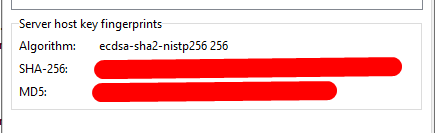
What I am trying to figure out is that where is the authentication failing in the process. I know the credentials are good because I can manually use them, so I have to assume it has something to do with the SshHostKeyFingerprint, so I think I need to know which key should I be using in the screen shot.

Screenshot_8.png

Reply with quote

Advertisement

martin
Site Admin
martin avatar
Joined:
Posts:
42,894
Location:
Prague, Czechia

Re: Authentication Failed

It's definitely not the SshHostKeyFingerprint.
Please post session log files both from the code and from successful "manual" login with the same credentials.

Reply with quote

crughp
Joined:
Posts:
2

Re: Authentication Failed

The logs are easy to get from the manual login, but I am not sure where they populate from the scripted task. Can you shed some light on that for me please?

Reply with quote

crughp
Joined:
Posts:
2

I seem to be getting an error on the script. I am not sure of the syntax and where to add that into the script. I tried a couple of different places and got this error.


Session.SessionLogPath : The term 'Session.SessionLogPath' is not recognized as the name of a cmdlet, function, script file, or operable
program. Check the spelling of the name, or if a path was included, verify that the path is correct and try again.
At C:\it.info\winscp.ps1:3 char:1
+ Session.SessionLogPath = "C:\it.info\script.log"
+ ~~~~~~~~~~~~~~~~~~~~~~
+ CategoryInfo : ObjectNotFound: (Session.SessionLogPath:String) [], CommandNotFoundException
+ FullyQualifiedErrorId : CommandNotFoundException

Exception calling "Open" with "1" argument(s): "Authentication failed.
Authentication log (see session log for details):
Using username "montgomerycnty_sftp".
Access denied.
Authentication failed."
At C:\it.info\winscp.ps1:18 char:5
+ $session.Open($sessionOptions)
+ ~~~~~~~~~~~~~~~~~~~~~~~~~~~~~~
+ CategoryInfo : NotSpecified: (:) [], MethodInvocationException
+ FullyQualifiedErrorId : SessionRemoteException

Reply with quote

Advertisement

You can post new topics in this forum