WinSCP re-authenticates on file save with OTP, but works correctly via SSH port forwarding

Advertisement

akari
Joined:
Posts:
8

WinSCP re-authenticates on file save with OTP, but works correctly via SSH port forwarding

Hi,

I am experiencing an issue when using WinSCP with a server that requires a password and a verification code for authentication.

Steps to reproduce:
  • Connect to the server using WinSCP.
  • Enter the password and verification code.
  • Login succeeds.
  • Open a remote file and edit it (tested with both the internal editor and an external editor).
  • Save the file.
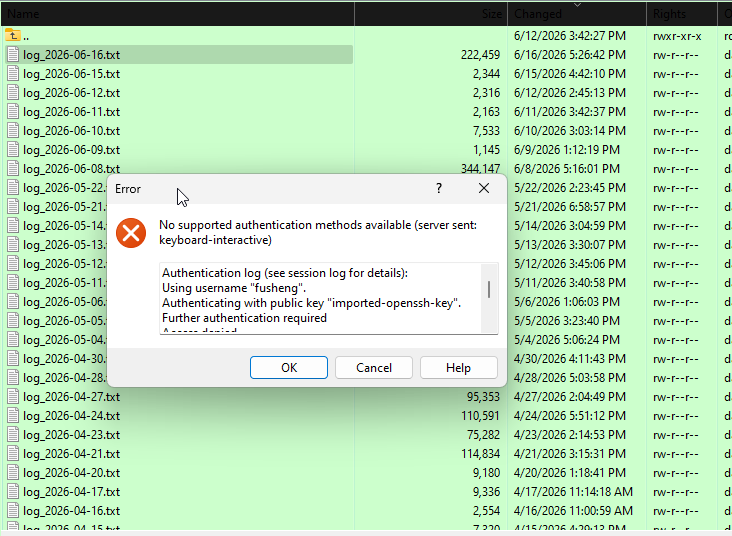
At this point, WinSCP prompts for the verification code again. If I continue editing and saving files within a short period of time, eventually the connection fails with:
No supported authentication methods available

NkhtvkT2Kn.png

Reply with quote

Advertisement

martin
Site Admin
martin avatar
Joined:
Posts:
42,963
Location:
Prague, Czechia

Re: WinSCP re-authenticates on file save with OTP, but works correctly via SSH port forwarding

Thanks you get an OTP prompt for the first save is expected, as edited files are uploaded using a separate connection. For the "No supported authentication methods available" problem, please post session log file.

Reply with quote

akari
Joined:
Posts:
8

Re: WinSCP re-authenticates on file save with OTP, but works correctly via SSH port forwarding

Sorry for the late reply. Here is the log file.
  • winscp.log (48.84 KB, Private file)

Reply with quote

martin
Site Admin
martin avatar

Re: WinSCP re-authenticates on file save with OTP, but works correctly via SSH port forwarding

You wrote that saving works for some time. But I do not see that in the log. It is failing from the very first save. So how is it? It looks like you are actually not able to use your one-time-password second time for the background session.

Reply with quote

Advertisement

You can post new topics in this forum