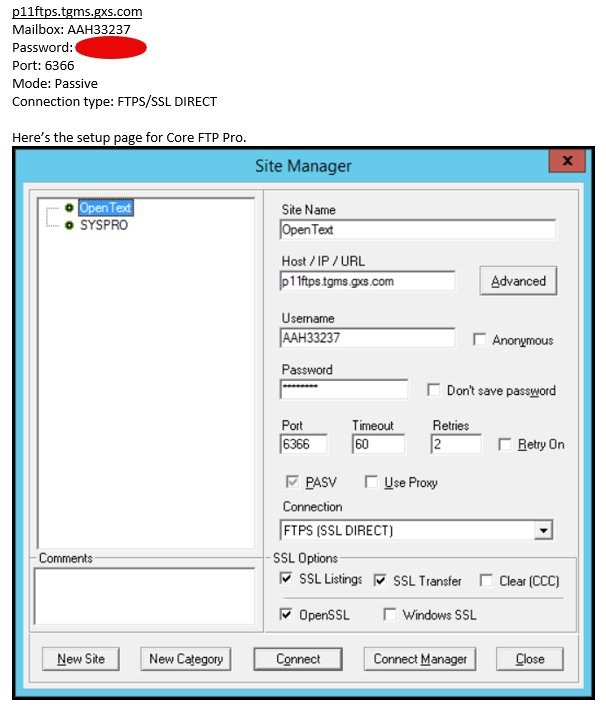
How do I match this setup in WinSCP?

Advertisement

richwork128
Guest

How do I match this setup in WinSCP?

I have a configuration for Core FTP that has been working, but is kind of a Black Box... And doesnt seem to allow automation...

I want to adopt it in Win SCP.... But all my experiments do not connect...

Any ideas....

2026-10-14_16-18-38.png

Reply with quote

Advertisement

martin◆
Site Admin
martin avatar
Joined:
Posts:
43,094
Location:
Prague, Czechia

Re: How do I match this setup in WinSCP?

On the Login dialog, select "FTP" protocol. And I believe that the "SSL Direct" might be equivalent of "TLS/SSL Implicit Encryption" (if that does not work, try Explicit too). Change the default implicit port 990 to 6366 of your server.
And enter your hostname, username and password.
https://winscp.net/eng/docs/ui_login

Reply with quote

richwork128
Guest

How do I match this setup in WinSCP?

I have tried a number of different options.... So far the "this looks closest" result is...
  • FTP
  • TLS/SSL Implicit encryption...
This way I get a connection and then Access Denied...
Pretty sure I have the right password, but I am going to check with both the Client and with Open Text (We have two Mailboxes with Open Text... No issue connecting to the second...)
The Second is using SFTP
(
File transfer protocol = SFTP-3
Cryptographic protocol = SSH-2
SSH implementation = APACHE-SSHD-2.12.0
Encryption algorithm = AES-256 SDCTR (AES-NI accelerated)
Compression = No
)

Reply with quote

martin◆
Site Admin
martin avatar

Re: How do I match this setup in WinSCP?

If you can login with Core FTP and not with WinSCP with the same setup, please post log files from both.

Reply with quote

richwork
Joined:
Posts:
1
Location:
West Coast

I will see...
The Core_FTP setup is kind of in a Black Box and I dont have access to it... I'll see if its logging anything....
I'll at least post the logs from WinSCP...

Reply with quote

Advertisement

You can post new topics in this forum