- dinoop.p1
- Joined:
- Posts:
- 3
Option for closing a tab without opening it
Advertisement
If I opened a work-space with multiple tabs, and wishes to close few unwanted ones , there is no option to close it directly. Users hopes there exists a "close tab" option when he click the right button, because this is followed by all major browsers. But WinSCP tries to connect to the server when the user "right" clicks first time, and wants to wait until it finishes before disconnecting :(
Advertisement
-
martin◆
Site Admin -
- Joined:
- Posts:
- 43,134
- Location:
- Prague, Czechia
Re: Option for closing a tab without opening it
Thanks for your feedback. I'll consider improving this.
- mwansari
- Joined:
- Posts:
- 11
+1 for this feature.
_________________
MWAnsari
MWAnsari
- mregister
- Joined:
- Posts:
- 3
Begging you to do this
@martin A surprising request found! Please do it, I am struggling daily with lost paths.
Other multi-tabbed programs have it.
Greetings!
M
Other multi-tabbed programs have it.
Greetings!
M
-
martin◆
Site Admin -
Re: Begging you to do this
Since WinSCP 5.14 (2018), you can use the close button to close a non-active disconnected session without a need to reconnect it.
Issue 1393 – Close button on session tab
https://winscp.net/eng/docs/ui_tabs
Issue 1393 – Close button on session tab
https://winscp.net/eng/docs/ui_tabs
Advertisement
- mregister
- Joined:
- Posts:
- 3
Accidentally closing tabs all day then wondering where was that path
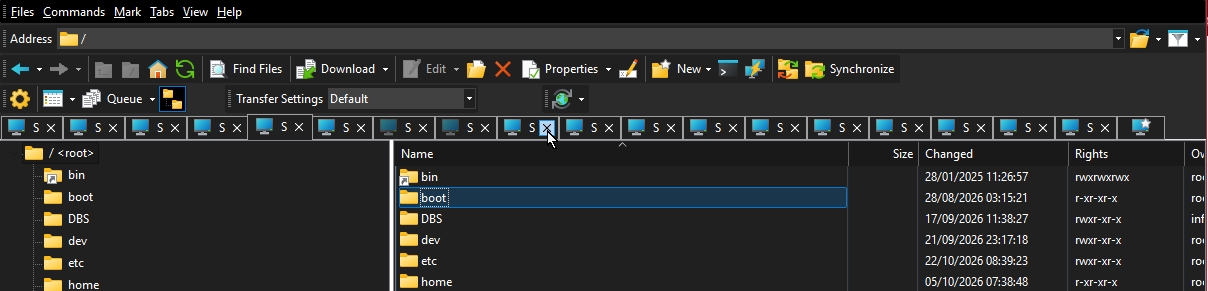
@martin I wanted to say the opposite, I'm not sure why I posted here and not in that other ticket somebody begging you to remove the X from the tabs. I have the same issue, I use 10–20 tabs, all the top bar of the window is just X X X X X with tiny spaces. I'm constantly closing unwanted tabs and search after for minutes what tab was that.
MTPuTTY have a very nice implementation. No X on any tab, but still can be closed
Alt+F4 or right click Close. With WinSCP all my day is a nightmare. Otherwise it's feature rich, just that X makes me pull out all my hair.
-
martin◆
Site Admin -
Re: Accidentally closing tabs all day then wondering where was that path
@mregister: Please post a screenshot.
- mregister
- Joined:
- Posts:
- 3
screenshot
screenshot with many tabs with X close
-
martin◆
Site Admin -
- Joined:
- Posts:
- 43,134
- Location:
- Prague, Czechia
Re: screenshot
Ok, in this case, hiding the close button might be an improvement.
I have added this request to the tracker:
Issue 2479 – Hide tab close buttons when tabs get too small
You can vote for it there.
Though the "all the top bar of the window is just X X X X X with tiny spaces" is imo bit exaggeration :)
I have added this request to the tracker:
Issue 2479 – Hide tab close buttons when tabs get too small
You can vote for it there.
Though the "all the top bar of the window is just X X X X X with tiny spaces" is imo bit exaggeration :)
Advertisement
You can post new topics in this forum