Exclude files/folders from synchronization

Advertisement

ChuckT
Joined:
Posts:
10
Location:
Overgaard, AZ

Exclude files/folders from synchronization

Good morning.

I would like to request the ability to exclude files and/or folders from the synchronization process, as I'm sure other users here would appreciate the same ability.

I have four folders on the server that I work on daily, that have over 400 files and 317 folders that only change once a year.

If there is an ability to mark that parent folder as Exempt that would be awesome! That would cut down almost three minutes of scanning each time I run the sync (quite a few times a day).

Thanks!

Reply with quote

Advertisement

ChuckT
Joined:
Posts:
10
Location:
Overgaard, AZ

Re: Exclude files/folders from synchronization

I was already in the right spot, I just had to mess with it a little bit more.

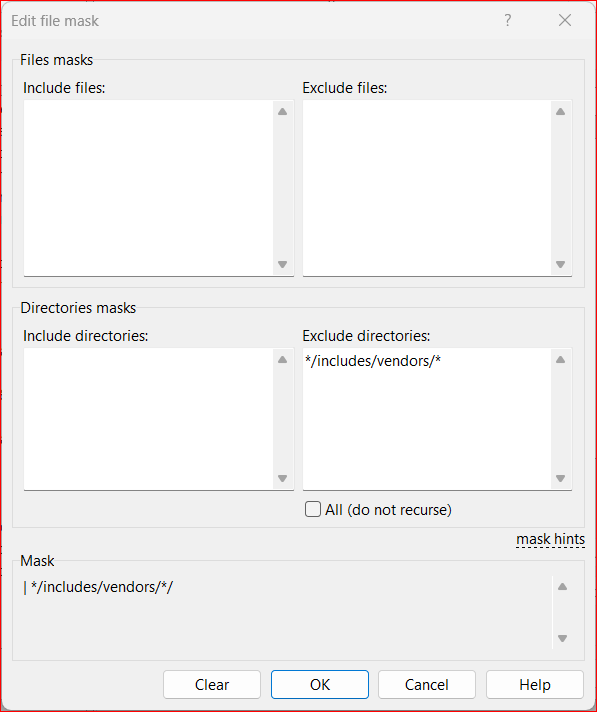
I was already in the right place, just didn't realize that the program *must* have wildcards even for directories. Usually when you include a path, it will include the sub folders. I didn't figure WinSCP would need to go back to the 1900's for exclusions - lol

Now that I fixed it (working vs not_working attachments), it is working correctly.

Thank you for verifying I was in the correct area!

Description: In this setup, it is EXCLUDING the folders and no longer trying to sync them.

working.png

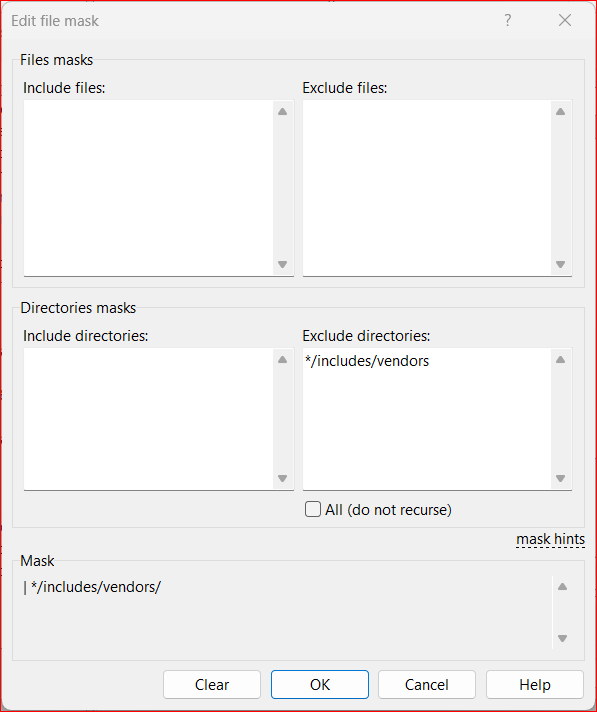
Description: In this setup, it was still trying to sync the folder/s.

not_working.png

Reply with quote

martin
Site Admin
martin avatar

Re: Exclude files/folders from synchronization

The | */includes/vendors/ mask should be enough (I've just tested it). If it does not work for you, please post a session log file.

Reply with quote

ChuckT
Joined:
Posts:
10
Location:
Overgaard, AZ

Re: Exclude files/folders from synchronization

That also seems to work, sir. I removed changed
*/includes/vendors/*
to
*/includes/vendors/
and the program automatically stripped the trailing
/
so it is listed as
*/includes/vendors
I have verified that it doesn't touch any of the 173 folders under it during the scan.

Thanks again!

Reply with quote

Advertisement

You can post new topics in this forum