Remote Server Not Showing Details

Advertisement

dan15237
Joined:
Posts:
2
Location:
Pittsburgh PA

Remote Server Not Showing Details

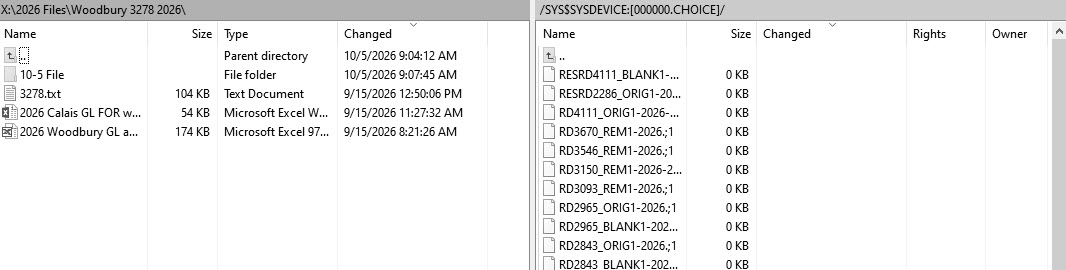
We are trying out SCP and have found an issue we can't explain. We are moving files from a remote server to a local computer and also from the local computer to the remote server. When first using SCP after installing all works as expected. Subsequent uses do NOT show the file details on the remote server which in our use case is relatively critical. The file details show on the local computer as expected. Screenshot is attached showing local and remote. Is there a setting that is changing the behavior of the remote server not allowing the details to show?

Description: Screenshot.

SCP Issue.jpg

Reply with quote

Advertisement

martin◆
Site Admin
martin avatar
Joined:
Posts:
43,055
Location:
Prague, Czechia

Re: Remote Server Not Showing Details

Please attach a full session log file showing the problem (using the latest version of WinSCP).

To generate the session log file, enable logging, log in to your server and do the operation and only the operation that causes the error. Submit the log with your post as an attachment. Note that passwords and passphrases not stored in the log. You may want to remove other data you consider sensitive though, such as host names, IP addresses, account names or file names (unless they are relevant to the problem). If you do not want to post the log publicly, you can mark the attachment as private.

Reply with quote

dan15237
Joined:
Posts:
2
Location:
Pittsburgh PA

Re: Remote Server Not Showing Details

martin wrote:

Please attach a full session log file showing the problem (using the latest version of WinSCP).

To generate the session log file, enable logging, log in to your server and do the operation and only the operation that causes the error. Submit the log with your post as an attachment. Note that passwords and passphrases not stored in the log. You may want to remove other data you consider sensitive though, such as host names, IP addresses, account names or file names (unless they are relevant to the problem). If you do not want to post the log publicly, you can mark the attachment as private.
  • MMS-FTP.log (19.77 KB, Private file)
Description: Log file.

Reply with quote

Advertisement

You can post new topics in this forum