Possible WinSCP process leak when launching PuTTY
I noticed a possible issue with WinSCP when using the integrated Open in PuTTY functionality.
WinSCP 6.6.3 RC
Steps to reproduce:
Open WinSCP and connect to a server.
Launch a PuTTY session using WinSCP's Open in PuTTY option.
Close the WinSCP window.
Repeat the same process several times.
Each time, a new WinSCP.exe process remains running in the background.
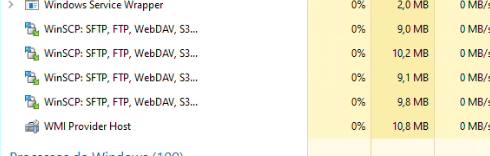
After repeating the procedure, multiple WinSCP processes accumulate in Task Manager, each using around 9–10 MB of memory.
Interestingly, if I open WinSCP, connect to the server, do not launch PuTTY, and simply close WinSCP, the process terminates normally.
So the issue appears to be specifically related to launching PuTTY from WinSCP. There are no active transfers or other WinSCP windows open when the processes remain.
Expected behavior: WinSCP should terminate its process after the application window is closed and there are no active operations.
Actual behavior: A WinSCP process remains running in the background for each WinSCP/PuTTY session that was opened.
WinSCP 6.6.3 RC
Steps to reproduce:
Open WinSCP and connect to a server.
Launch a PuTTY session using WinSCP's Open in PuTTY option.
Close the WinSCP window.
Repeat the same process several times.
Each time, a new WinSCP.exe process remains running in the background.
After repeating the procedure, multiple WinSCP processes accumulate in Task Manager, each using around 9–10 MB of memory.
Interestingly, if I open WinSCP, connect to the server, do not launch PuTTY, and simply close WinSCP, the process terminates normally.
So the issue appears to be specifically related to launching PuTTY from WinSCP. There are no active transfers or other WinSCP windows open when the processes remain.
Expected behavior: WinSCP should terminate its process after the application window is closed and there are no active operations.
Actual behavior: A WinSCP process remains running in the background for each WinSCP/PuTTY session that was opened.
- Captura de tela 2026-09-07 222904.png (56.41 KB)