Microsoft Store version cannot update or reinstall WinSCP – Error 0x80073CF6
Hi Martin,
I'm experiencing an issue with the Microsoft Store version of WinSCP.
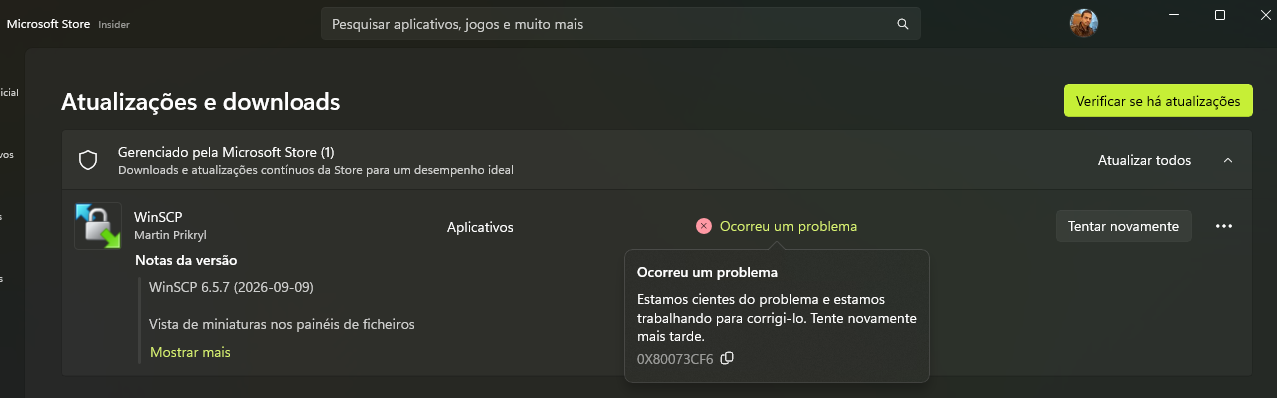
I initially tried to update WinSCP several times through the Microsoft Store, but the update repeatedly failed. The Microsoft Store displayed the following message:
After restarting Windows, the update was eventually installed successfully. However, after the update, WinSCP stopped launching.
I tried launching WinSCP from the Start menu and also by clicking Open directly in the Microsoft Store, but nothing happened.
I then tried the Repair/Reset option in Windows Settings, but Windows reported that the application could not be repaired/restored.
I subsequently uninstalled WinSCP completely and tried to perform a clean installation.
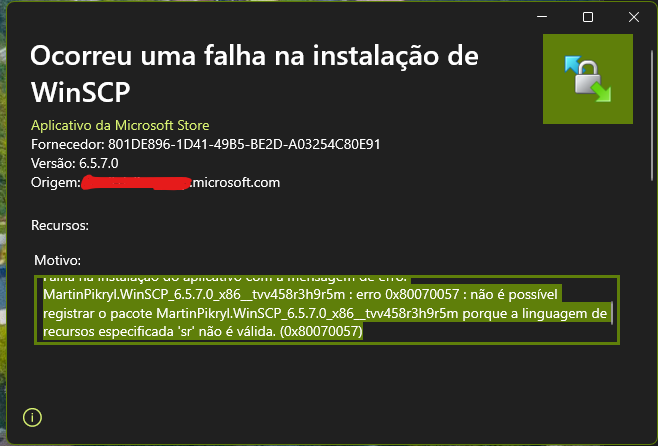
However, the clean installation from the Microsoft Store also fails with the same error 0x80073CF6.
The complete sequence was:
It seems there may be an issue with the deployment or installation of the MSIX/AppX package distributed through the Microsoft Store.
Could you please let me know if this is a known issue with the Microsoft Store package, or if there is a recommended way to diagnose what is causing the 0x80073CF6 error?
I can provide Windows version/build information, logs, screenshots, or any other information that may help investigate the issue.
Thank you!
I'm experiencing an issue with the Microsoft Store version of WinSCP.
I initially tried to update WinSCP several times through the Microsoft Store, but the update repeatedly failed. The Microsoft Store displayed the following message:
The package identified in the error is:Something happened. We're aware of the problem and we're working to fix it. Try again later.
Error code:
0x80073CF6
9P0PQ8B65N8X-MartinPikryl.WinSCP
I tried launching WinSCP from the Start menu and also by clicking Open directly in the Microsoft Store, but nothing happened.
I then tried the Repair/Reset option in Windows Settings, but Windows reported that the application could not be repaired/restored.
I subsequently uninstalled WinSCP completely and tried to perform a clean installation.
However, the clean installation from the Microsoft Store also fails with the same error 0x80073CF6.
The complete sequence was:
- WinSCP repeatedly failed to update through Microsoft Store with error 0x80073CF6.
- I restarted Windows.
- The update was eventually installed.
- After the update, WinSCP stopped launching.
- The Repair/Reset option reported that the application could not be repaired/restored.
- I uninstalled WinSCP.
- I tried to reinstall it from the Microsoft Store.
- The installation failed again with the same 0x80073CF6 error.
It seems there may be an issue with the deployment or installation of the MSIX/AppX package distributed through the Microsoft Store.
Could you please let me know if this is a known issue with the Microsoft Store package, or if there is a recommended way to diagnose what is causing the 0x80073CF6 error?
I can provide Windows version/build information, logs, screenshots, or any other information that may help investigate the issue.
Thank you!
- Captura de tela 2026-09-09 200037.png (108.83 KB)