Remote files Properties unreadable
Since 6.6 I can no longer see the values for remote file properties.
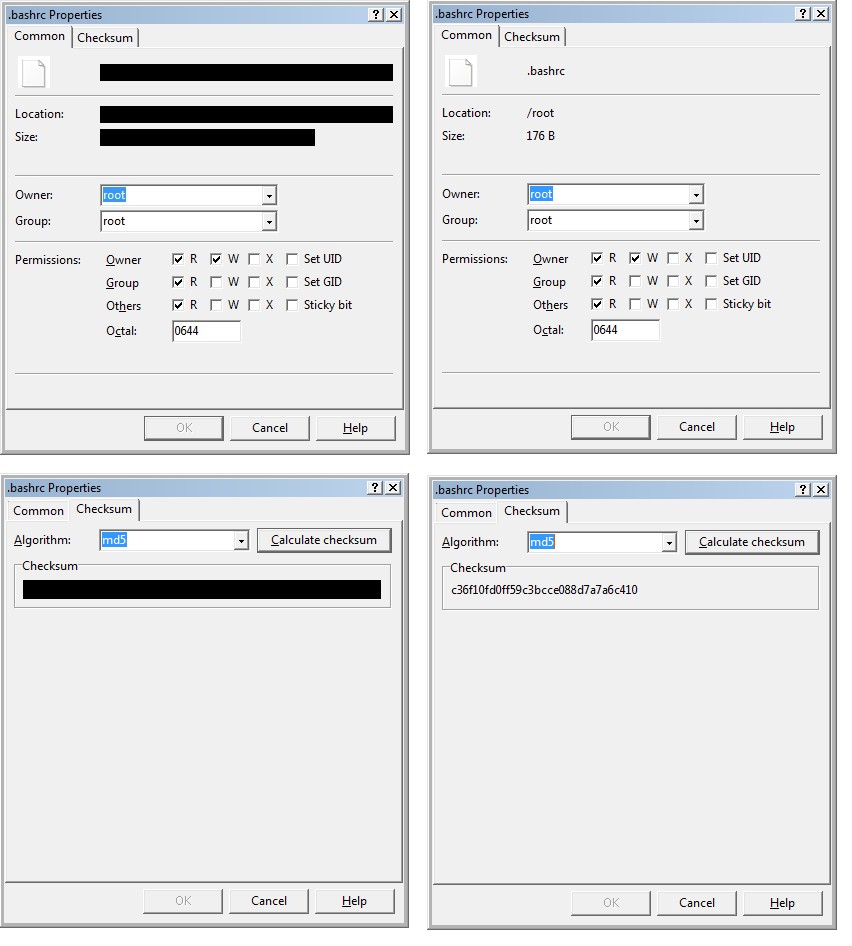
If I right-click a remote file and select 'properties' the Properties overlay has the filename, location, and size showing as solid black bar (? black text on a black background?) (see image)
Viewing the same on 6.5.7 shows the file correctly.
I've tried 6.6.4.RC-Portable, and 6.7 (installed) -- both display the same (black bar)
Interestingly: local files display correctly in all versions. Different remote servers (SFTP) makes no difference (6.7 is wrong on all of them, but 6.5.7 is ok)
Is there some display setting I need to tweak in 6.6+ which is affecting the colours (theme?)
Changing the "Interface theme" between Light, Dark, Automatic makes no difference. Nor Commander vs. Explorer.
Thanks,
James
( Win 7 Pro SP1 32-bit; SFTP; just upgraded from 6.5.7 to 6.7, but also tested on 6.6 )
If I right-click a remote file and select 'properties' the Properties overlay has the filename, location, and size showing as solid black bar (? black text on a black background?) (see image)
Viewing the same on 6.5.7 shows the file correctly.
I've tried 6.6.4.RC-Portable, and 6.7 (installed) -- both display the same (black bar)
Interestingly: local files display correctly in all versions. Different remote servers (SFTP) makes no difference (6.7 is wrong on all of them, but 6.5.7 is ok)
Is there some display setting I need to tweak in 6.6+ which is affecting the colours (theme?)
Changing the "Interface theme" between Light, Dark, Automatic makes no difference. Nor Commander vs. Explorer.
Thanks,
James
( Win 7 Pro SP1 32-bit; SFTP; just upgraded from 6.5.7 to 6.7, but also tested on 6.6 )
- fileproperties.jpg (119.86 KB)
Description: Remote file, properties. v6.7 on left, v6.5.7 on right (same file)