This is an old revision of the document!
Importing Sites
WinSCP allows you to import sites from PuTTY SSH client, KiTTY SSH client, FileZilla FTP/SFTP client, OpenSSH config file, WinSCP INI file and host keys from OpenSSH known_hosts file.
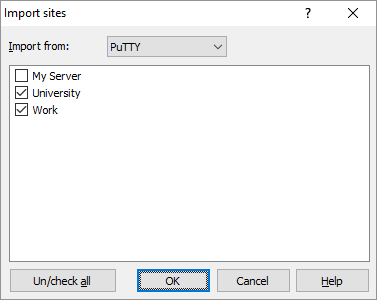
To open Import session dialog go to Tools > Import Sites on Login dialog.
On the dialog, select if you want to import from PuTTY, KiTTY, FileZilla, OpenSSH config, WinSCP INI file or known_hosts files.
You will receive list of all sites/host keys stored in the selected application or configuration file. Next to each site name there is a checkbox. Use it to select sites/keys you would like to import. By default WinSCP selects only sites with supported protocol,1 for which there is no WinSCP site with the same name. You can alter the selection as you like.
PuTTY/KiTTY
For PuTTY/KiTTY, WinSCP looks for sites in registry.
FileZilla
For FileZilla, WinSCP looks for sites in C:\Users\username\AppData\Roaming\FileZilla\sitemanager.xml.2
INI file
You can use this option to selectively import only some sites from WinSCP INI configuration file (as opposed to importing whole configuration). Use Browse button to browse for the location of the INI file.
# Подключение к sshproxy Host sshproxy 10.2.0.30
Hostname 10.2.0.30
Port 222
User prowler
IdentityFile ~/.ssh/siberteam
Host art-ftp art-ftp://ftp.betsoftgaming.com
HostName 141.0.168.83
User artist
Port 222
ProxyJump sshproxy
IdentityFile ~/.ssh/siberteam
= # ===== # Beta / Copy / Staging # ====== #= GP3 Host gp3-copy-gs1 gs1-gp3.discreetgaming.com
Hostname 141.0.173.104
Host gp3-copy-gs2 gs2-gp3.discreetgaming.com
Hostname 141.0.173.186
Host gp3-copy-lb games-gp3.discreetgaming.com
Hostname 141.0.173.187
#= NG Host ng-copy-gs1 gs1-ng-copy.nucleusgaming.com
Hostname 94.75.218.248
Host ng-copy-gs2 gs2-ng-copy.nucleusgaming.com
Hostname 95.168.163.40
Host ng-copy-lb games-ng-copy.nucleusgaming.com
Hostname 94.75.218.179
# BETA Host beta-copy-gs1 gs1-beta.discreetgaming.com
Hostname 69.55.53.43
Host beta-copy-gs2 gs2-beta.discreetgaming.com
Hostname 69.55.53.44
Host beta-copy-lb games-beta.discreetgaming.com
Hostname 69.55.53.45
# discreetgaming.com / nucleusgaming.com GS servers Host gs?-*.discreetgaming.com gs?-ng-copy.nucleusgaming.com *-copy-gs?
User prowler
Port 222
ProxyJump sshproxy
IdentityFile ~/.ssh/siberteam
# discreetgaming.com / nucleusgaming.com LB servers Host games-*.discreetgaming.com games-ng-copy.nucleusgaming.com *-copy-lb
User auditor
Port 222
ProxyJump sshproxy
# ====== # Live # ====== #= NG Host ng-live-gs1 gs1-ng.nucleusgaming.com
Hostname 212.32.16.139
Host ng-live-gs2 gs2-ng.nucleusgaming.com
Hostname 212.32.16.135
Host ng-live-gs3 gs3-ng.nucleusgaming.com
Hostname 212.32.16.136
Host ng-live-lb games-ng.nucleusgaming.com
Hostname 212.32.16.137
#= GP3 Host gp3-live-gs1 gs1-gp3.betsoftgaming.com
Hostname 90.190.149.151
Host gp3-live-gs2 gs2-gp3.betsoftgaming.com
Hostname 90.190.149.150
Host gp3-live-gs3 gs3-gp3.betsoftgaming.com
Hostname 90.190.149.149
Host gp3-live-gs4 gs4-gp3.betsoftgaming.com
Hostname 90.190.149.147
Host gp3-live-lb games-gp3.betsoftgaming.com
Hostname 88.196.98.186
#= C2SS Host live-c2ss-lb games-c2ss.betsoftgaming.com
HostName 80.245.208.77
Port 222
User reader
ProxyJump sshproxy
# betsoftgaming.com (Live) / nucleusgaming.com (Live) Host gs?-*.betsoftgaming.com games-*.betsoftgaming.com *-ng.nucleusgaming.com *-live-gs? *-live-c? *-live-lb
User prowler
Port 222
IdentityFile ~/.ssh/siberteam
ProxyJump sshproxy
OpenSSH known_hosts
For OpenSSH known_hosts files, WinSCP looks to C:\Users\username\.ssh\known_hosts. You can also paste hosts key in OpenSSH format from clipboard using Paste button.
WinSCP imports also SSH host keys from the source application cache for hostnames from all selected sites. So you do not need to verify again the SSH host keys that you have verified in the other application already.
When you finish your selection, press OK to import the sites. Note that when the name of imported site collides with name of an existing site, WinSCP appends number to the end of the name to name it unique.
For session options that the source application does not have, WinSCP will use the defaults.